How to Manage Your Subscription: Change Frequency, Quantity, Skip, or Pause Orders
Managing Your Subscription: Frequency, Quantity, Skips & Pauses
Managing your subscription is simple and flexible. Whether you need to change your delivery frequency, adjust your quantity, skip an upcoming order, or pause shipments, you can do it all from your account in just a few clicks. This guide walks you through each option step by step, including key details for Exclusive Coffee Subscriptions (ECS), so you can stay in control of every order.
Table of Contents
- Changing Your Subscription Frequency
- Skipping an Order or Pausing Your Subscription
- Changing Your Subscription Quantity
- ECS Exclusion
Changing Your Subscription Frequency
- At the top right of the screen, click the person icon and "Subscriptions".
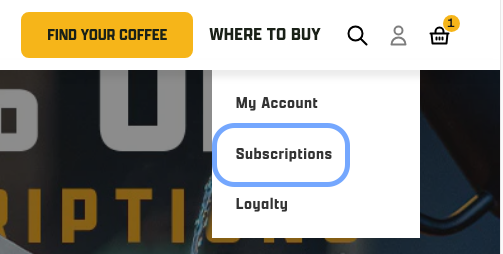
- Enter the email address associated with your account, you'll receive a secure one time use code to your email to login
- If you have any issues with this, please see Why can't I log in to my account on your website?
- Scroll down to the Upcoming Orders section and click the drop down arrow
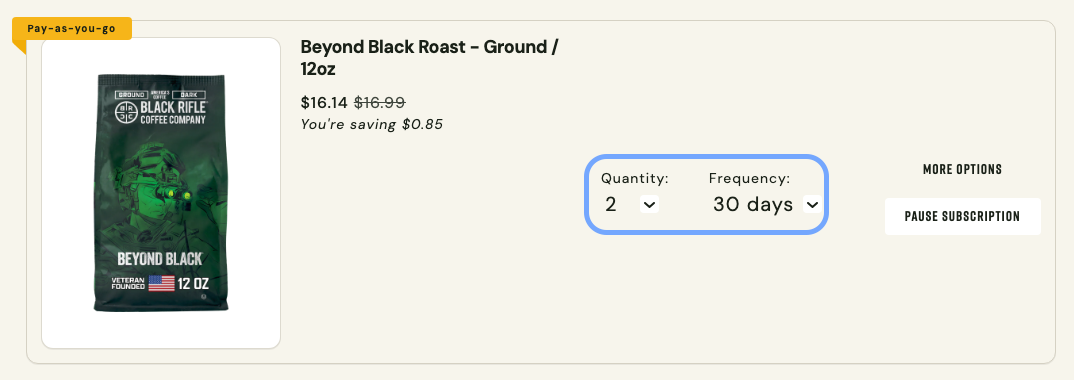
- Locate the Frequency dropdown and select your preferred delivery schedule.
-
Your update will apply to future orders automatically; no extra steps required.
Adjust Your Quantity
- At the top right of the screen, click the person icon and "Subscriptions".
- Enter the email address associated with your account, you'll receive a secure one time use code to your email to login
- If you have any issues with this, please see Why can't I log in to my account on your website?
- Scroll down to the Upcoming Orders section and click the drop down arrow
- Locate the Quantity dropdown and select your preferred amount.
-
Your update will apply to future orders automatically; no extra steps required.
Skipping an Order or Pausing Your Subscription
Our subscriptions are unable to be "paused" indefinitely, but you do have the ability to skip your next order or postpone the next order date up to 90 days.
- At the top right of the screen, click the person icon and "Subscriptions".
- Enter the email address associated with your account, you'll receive a secure one time use code to your email to login
- If you have any issues with this, please see Why can't I log in to my account on your website?
- Scroll down to the Upcoming Orders section and click the drop down arrow
From there, you can choose from the following options:
Skip Your Order
- Selecting Skip Your Order will skip the upcoming order and move your next charge date based on your subscription frequency.
- Be sure to click Skip Order to confirm.
- If you are subscribed to more than one product, select More Options to skip a single product instead of the full order.
Send Now
- Selecting Send Now will immediately charge the card on file and create your order.
Pause Subscription
- Selecting Pause Subscription will pause your subscription for 30, 60, or 90 days.
- Be sure to click Pause to save your selection.
Due to the exclusivity of the ECS micro-lot roasts, we are not able to allow subscribers to skip, pause, or reschedule any shipments for this subscription. If you need to skip even just one ECS order, you will need to cancel your subscription and rejoin the same way you did when you first started your ECS subscription: by keeping a close eye out for the launch day email on the first of each month!
Last Sip
If you found these instructions helpful, let us know!
If any issue is encountered with rescheduling your orders or the subscription itself, please contact us via email, chat (via the chat widget on the website), or give us a call (1-385-262-7184).
